


3D Design with the power of AI Find out more Powerful CNC software, without breaking the bank Discover now Advanced tools, intuitive workflow, limitless possibilities... Discover now Where Art meets Industry Discover now Carveco Maker CNC Software Logo Carveco Maker Plus cnc software logo Carveco Pro Logo

Complete CNC Design &
Toolpath Software

Built around real-world making, Carveco gives you an approachable place to start and the power to scale. From one-off projects to repeat production, its design and CNC tools grow with your skills, your workload and your business
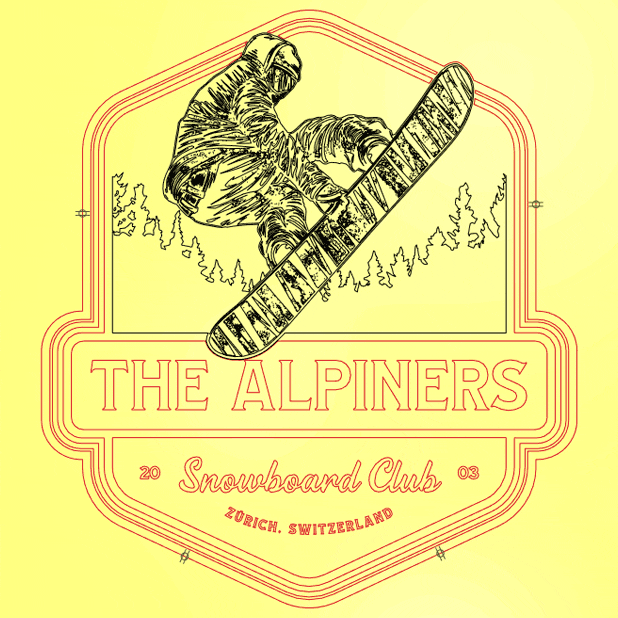
Vectors of 'The Alpiners Snowboard Club' V-Bit carved Snowboard sign as shown in Carveco software

1. Design Your Project

Craft unique designs from scratch or with imported 3D models, bitmaps, and vectors. Combine elements freely with no restrictions on model complexity or bed size.
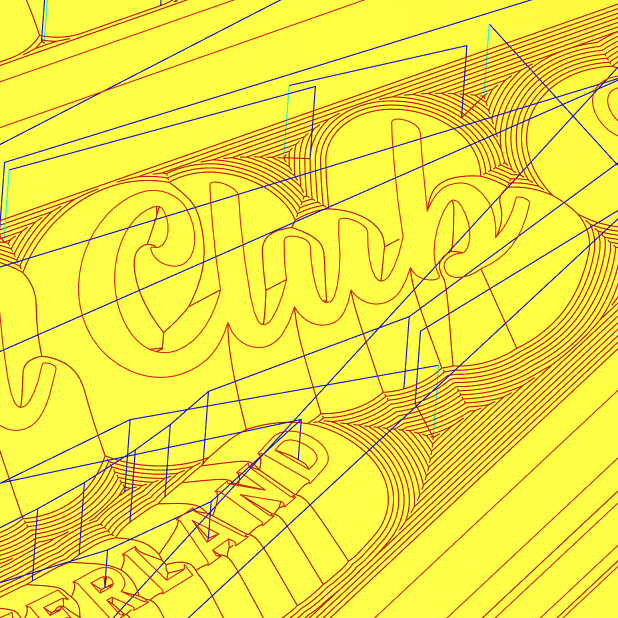
A close-up screenshot of a simulated toolpath in Carveco software showing tool movements around text

2. Plan Your Toolpaths

Select the best machining strategy for your design. Choose a tool, set your toolpath, fine-tune feeds and speeds, and view the results in a detailed machining simulation before cutting.

The finished and painted 'The Alpiners Snowboard Club' sign

3. Machine It!

Alongside standard G-code – Carveco has direct support for over 300 CNC machines and controllers. Load your toolpaths, set up your CNC material and press go to start machining.


Carveco Maker CNC Software Logo

From idea to finished cut, Carveco Maker makes CNC design and machining approachable.

Create artwork in 2D, bring your ideas to life in 3D with AI or imported models, simulate your machining and generate accurate toolpaths — all in one powerful, affordable package built for makers.

A 2D V-Bit carved coffee shop sign in Carveco Maker, displayed on a PC laptop
Carveco Maker Plus cnc software logo

Carveco Maker Plus takes your CNC work further with powerful 3D design and production-focused machining tools.

Create and refine detailed reliefs, nest parts to reduce material waste and streamline repeat jobs with greater toolpath control — all in one flexible package built to increase the range and scale of what you make.
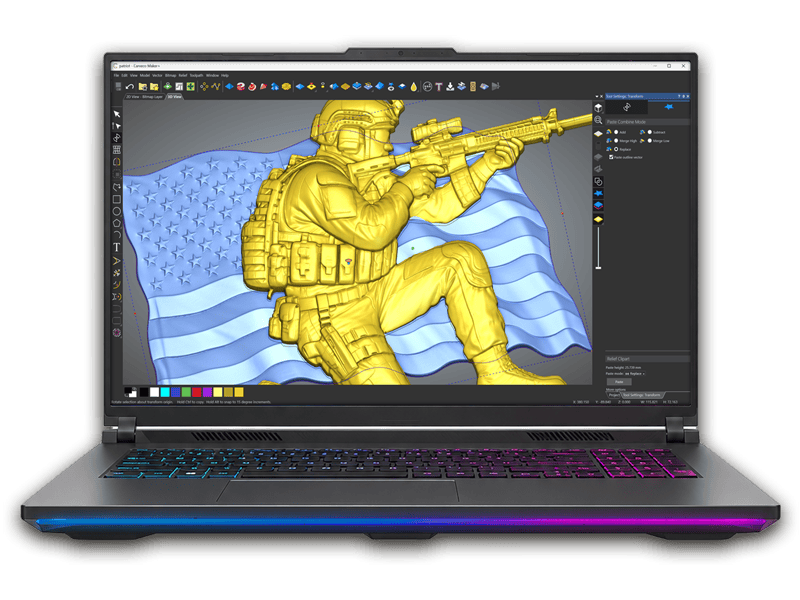
Combined 3D relief models of a US soldier and American flag in Carveco Maker Plus
Carveco Pro Logo
Carveco Pro Logo

Carveco Pro gives demanding creative professionals the power to sculpt intricate designs and manufacture exceptional pieces.

Push ideas further with advanced 3D relief design, precision sculpting, distinctive security and optical effects, manufacturing analysis tools and sophisticated machining strategies — giving you the freedom and control to take complex projects from concept through to production.

A medieval Warwickshire Knight coin designed in Carveco Pro, shown beside a monitor with the 3D relief design and a graphics tablet and pen

AI Generated Relief Models in Seconds.

Carveco’s AI Design Tools turn a design, photo, sketch, or simply a text description into a machinable 3D relief model you can take straight to your CNC, export or incorporate into your existing projects.

Carveco AI Tools are available with all Carveco Subscriptions.

Free 30-Day Trial On Subscription

No ‘example’ files here.

Put Carveco through a proper real-world test with the projects you actually want to design and cut.

Create or import your own designs, play with the AI tools, generate and save your own toolpaths, simulate your machining and see how Carveco fits your workflow before committing.

Compare Carveco Features

Not sure which Carveco product is right for you? Compare Maker, Maker Plus and Pro side by side to see how the design, 3D modelling and CNC machining tools grow across the range.

Choose the level that fits your needs today, with a clear path to scale as your projects become more ambitious or your business grows.

Created by Makers. Trusted by Pro’s

Being able to design and edit reliefs in Carveco Maker Plus really frees me up. I can have an idea and then execute it without spending hours searching for the perfect relief. I started with Maker but soon got demands for 3D items, so I invested in Maker Plus. At first, it was a slow and steady process, but following Leighton’s tutorials, I soon got to grips with all the tools, and now I can design faster than ever.
Lucas OdumChestnut Ridge EdgeLife
I have been looking for CNC software because I’m new to the CNC industry. After tinkering with a few CNC apps, I finally found the perfect one for me, it’s Carveco Maker Plus. With easy-to-follow videos all over the web and the best support I’ve seen from a company in a long time. If you’re looking for a company that will be there when you need them the most, Carveco is the company I recommend.
Russ CuevasCuevas Media
I love the software. I find it very easy to use and there doesn’t seem to be a limit to what it can do…. I couldn’t do the work without Carveco’s software.
Chad BookmanBHL Woodworks
We are tickled pink because we have a great product with great support that allows us to build what we need. Carveco is at the heart of our production.
Tyson LeavittCharmed Playhouses
Carveco’s software makes the process of going from CAD to CAM to machine very seamless. For my project, Carveco’s software made getting started quick with presets for different size end mills, and it was easy to set up relief carvings. My hope is that this project will inspire others to learn a new skill and take on bigger challenges.
Adam Sloan
I don’t know any other software anywhere else that allows you to bring in so many 3D models and work with them. At the price point of Carveco Maker, being able to do that is really awesome.
Casey MarwineCaseytheMaker

Latest News From Carveco


  • Carveco at Makers Central

Join us for Makers Central 2024!

April 18th, 2024|

Get ready for another exciting weekend of Makers Central, happening at the NEC in Birmingham, UK, this May 18th - 19th, [...]
  • Carveco Release Notes

Carveco V1.52 – Release Notes

April 9th, 2024|

Fixes Software activation error messaging: When starting-up your software on a computer using a language other than English, you may have experienced the software [...]

  • Carveco Release Notes

Carveco V1.51 – Release Notes

February 27th, 2024|

Fixes We received reports of Carveco software crashing on startup when run on a Windows 10 computer with an older Intel processor. This was [...]

  • Carveco Release Notes

Carveco V1.50 – Release Notes

January 23rd, 2024|

Enhancements Switch between flat and rotary simulation views: The Toggle Rotary/Flat button enables you to see how your machined piece would look both flat [...]

  • Carveco Release Notes

Carveco V1.49 – Release Notes

December 11th, 2023|

New We have added new post-processors to translate your design’s machining toolpaths into code recognised by your CNC machine. These include: GRBL rotary post-processors: [...]

Carveco on Instagram

Transform your reliefs in new ways with the new and improved Transform Tool.

Tilt, shear, stretch, lift, scale and rotate, live in 3D or with exact values.

Out now in Carveco Maker, Maker Plus and Pro.

carveco.com
This year Maker Camp 🏕️ became Mallet Camp ⚒️

We partnered up with the awesome team at @onefinitycnc to personalise mallets that were made with @highlandhardwoods. Finished with some oil from @bumblechutes and some were finished with epoxy from @totalboat. 

We also worked with @uncle_sam_metalworks, carving out scales on the Onefinity machines for the knives makers made at his workshop, before being sharpened by @tormek_sharpening, and @weaverleathersupply and @gusterleather helped them make some beautiful sheaths.

Shout out the legend @tony_the_tool for being chief mallet man, and you can listen to our adventure on @sttavernpod podcast in a few weeks. But best of all, was just catching up with our friends from across the pond. You guys rock 🤘
We're on our way to @TheMakerCamp!

Last year was one of our favourite weekends: good people, late nights and a CNC machine under disco lights. We couldn't miss it this year.

Who else is going?
Ever run a whole carve slow just to get through the first pass safely?

That opening line is the only time your bit is fully surrounded by material. Every pass after it only cuts one side. So now you can ease off on just that first pass, then let the rest run at full speed.

Find it in the Machine Relief and Area Clearance toolpaths. Out in Carveco Maker, Maker Plus and Pro, update to 1.69.

carveco.com
New & Improved Transform Tool ✨

Your relief now sits inside a full 3D bounding box, with new handles to tilt it into a wedge, shear it at an angle, and raise or lower it off the zero plane without stretching any detail. Drag and watch it change live, or type in exact values when you need precision.

Out now in Carveco Maker, Maker Plus and Pro. Update to 1.69 to try it.

carveco.com
Couldn't make it to Atlanta? We've got you covered. 👊

The full "What's New" presentation from the 2026 Carveco User Group is now on YouTube. That's every new feature, a sneak peek at what's in development, and the roadmap for what's coming next, all recorded live.

Watch it now on our YouTube channel (link in bio).
Same photo, two models, two different reliefs. 🔥

Every example here goes through both of our AI models. Fidelity keeps to your photo, right down to the fine texture in hair, fabric and skin. Forge makes its own decisions, tidying hair, sharpening features like eyebrows and simplifying busy backgrounds so the shapes stand out.

Find out more at carveco.com/ai (link in bio)
Two AI models, one choice to make.

Fidelity keeps your image exactly as it is, so what you see in your photo is what ends up in your relief.

Forge puts its own spin on your image and gives you a relief with real presence, even from a rough photo or a quick sketch.

Which model do you prefer?
We’re delighted to announce that Touch Beyond Vision has been shortlisted for the Made in Britain Impact Awards 2026, in the Social Impact category.

It’s been more than a year since we opened the doors to Touch Beyond Vision at London’s OXO Tower, but the response to the project continues to surprise us.

Touch Beyond Vision began with an ambition to explore how our AI technology could help make visual culture more accessible to people who are blind or visually impaired.

We brought together Carveco AI, CNC machining and 3D printing to reinterpret more than 20 photographs, artworks and recognisable British landmarks as physical, tactile experiences. Visitors could feel their way across details that would ordinarily exist only as an image, supported by Braille and audio descriptions throughout the exhibition.

Crucially, we didn’t want to create something for the blind and visually impaired community without creating it with them. Their experiences and feedback helped shape the project throughout its development.

That collaboration also led to one of the most personal parts of the exhibition: a wall of everyday photographs submitted by blind and visually impaired people themselves. Family moments, memories and personal images were transformed into tactile 3D pieces — giving photographs that might otherwise be inaccessible a new physical form.

Since the exhibition, Touch Beyond Vision has travelled much further than we ever expected. Earlier this year, it received three Webby Awards, across Experimental & Innovation, Belonging & Inclusion, and Public Service & Activism.

Now, to have the project recognised by Made in Britain, and specifically for its social impact, feels particularly meaningful.

Thank you to everyone at Carveco who helped make the project happen, and especially to the blind and visually impaired participants, accessibility specialists, educators and organisations who gave us their time, knowledge and trust.

Congratulations to all of this year’s finalists.

Find out more about Touch Beyond Vision at touch-beyond-vision.com.
New tutorial just dropped. 🔥

Our full deep-dive into Relief Generation with Fidelity and Forge is out now on YouTube, covering Generate with Image, Generate with Text, and everything in between.

Whether you're new to Carveco AI or want to get more out of it, this one's for you.

🔗 Watch now on YouTube @ Carveco (link in bio)
Sorry this one took a while...

You can now (properly) add a Tapered Ball Nose to your Tool Database in Carveco, without calling it a Radiused Engraving bit.

*This will not affect any of your current bits set up as a Radiused Engraving bit.
Carveco AI just got a major upgrade. 🔥 Say hello to Fidelity and Forge, two new AI models that replace our original relief generation engine, giving you a direct choice over how your source image becomes a relief.

Fidelity prioritises accuracy. It reproduces exactly what's in your source image, the same faithful approach you know from Carveco AI, now producing noticeably sharper, cleaner results. It's the perfect choice when a true-to-source likeness matters most.

Forge takes a different approach. It reinterprets your source image before generating the relief, reshaping busy, unclear, or poorly-lit photos into something bold, clean, and carvable. 
It can even turn flat sketches and doodles into fully realised reliefs, helping you turn a rough idea into reality.

Both models work across Generate with Text and Generate with Image, cost the same 5 credits per generation as before, and you can swap between them at any time. 
We've also added a new Shape slider alongside the existing depth, detail, and zero plane controls, giving you even more ways to perfect your model before taking it in to your project.

Fidelity and Forge are out now for Maker, Maker+, and Carveco Pro.

Want the full breakdown of how they work? Head to carveco.com/ai to learn more. (link in bio)
Loading the next set of instagram posts...